Create a Professional Book Cover —Even If You’re a Beginner
Follow a simple, step-by-step process to create a book cover you’ll actually be proud of — without feeling overwhelmed.
🎁 Special Bonus: Private Feedback
Submit any one design of your choice and get personalized, detailed feedback from me. Only available to the next 5 students — slots are filling fast!
Minimal experience needed • Learn at your own pace • Lifetime access

The cover we design together in the beginner course
YOU can learn to do this Today!
Go from this...
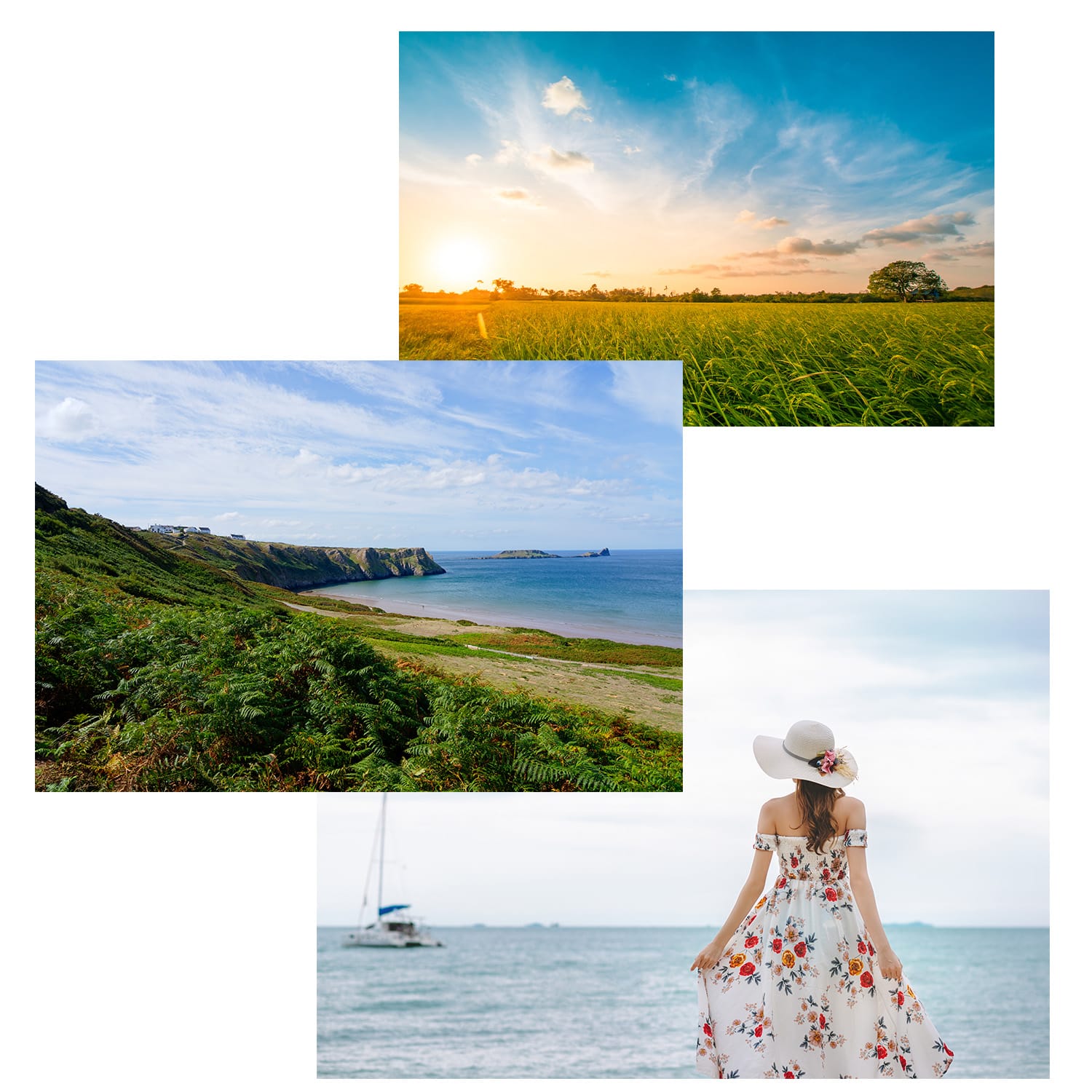
To this in less than an hour

“I’ve admired Deborah’s book covers for years, and her techniques are surprisingly easy to apply. Things finally started to make sense, and I feel so much more confident in my designs — even when working in other programs.” - Michelle C., Author
Have you always wanted to learn how to design for book covers?
You're in the right spot.
Inside this beginner-friendly course, you’ll learn exactly how to go from confused and frustrated… to confident and capable. I show you step-by-step how to transform 3 basic stock images into a stunning cover design.
No fluff. No complicated jargon.
Just clear, step-by-step guidance that actually makes sense.
By the End of This Course, You'll Know How To:
Design a complete book cover from scratch
Create covers that look polished and professional
Confidently design using Adobe Photoshop for real projects
In just one hour you'll have created your first professional book cover design.
You also get access to Book Cover Design Tips, including:
Learn everything you need to know about getting new fonts, installing them, and using them.
Learn what royalty-free stock websites I recommend and use
As easy as 1, 2, 3 step guide as to where to start at the end of the course
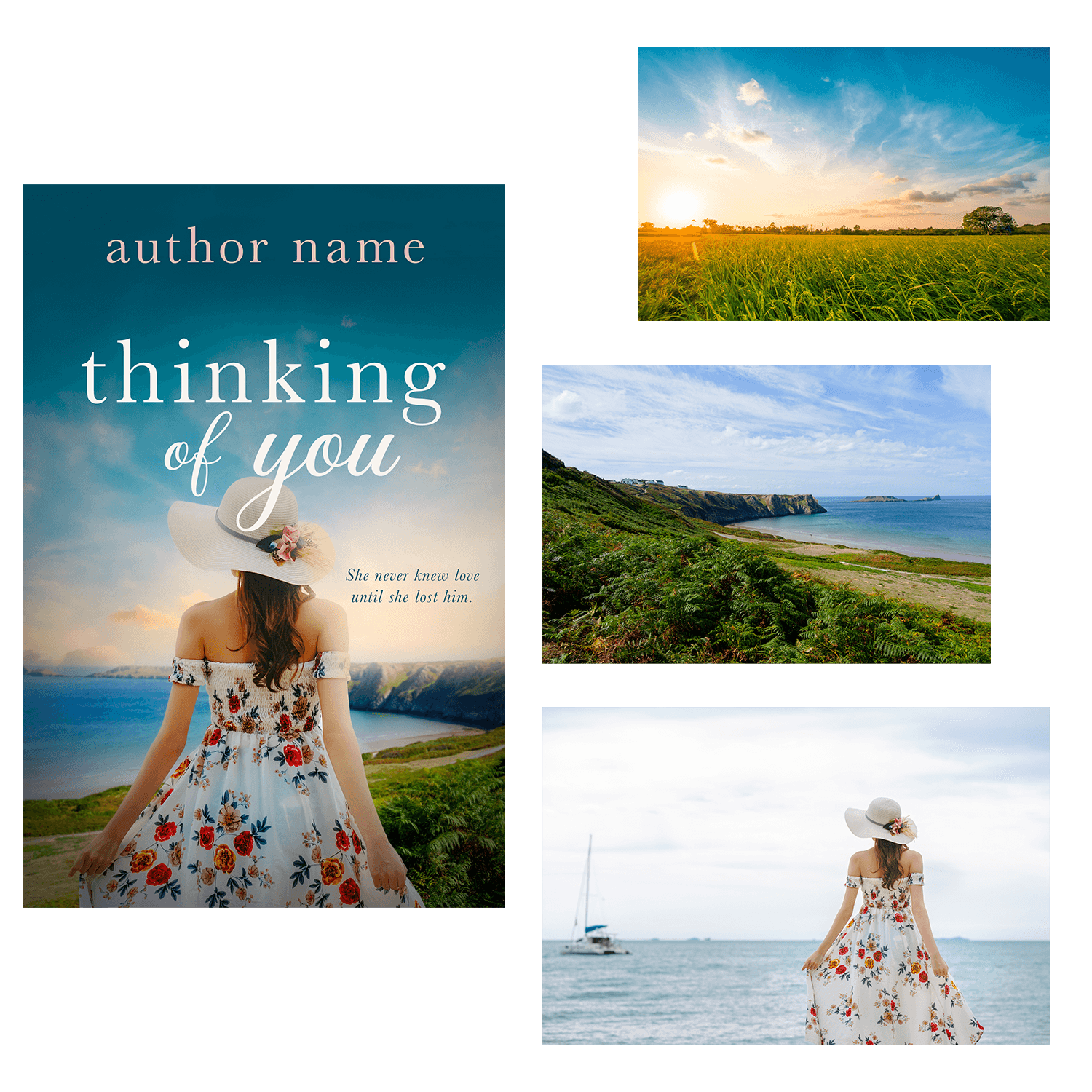
Example cover showing the three images we use in the course to create a beautiful design together
While I teach using Photoshop, the design principles can be applied in other programs as well.
Your First Cover is Closer Than You Think
You don’t need years of experience to create a great book cover.
You just need a clear process and the right guidance.
This course is designed to help you go from
“I have no idea where to start”
to “I actually made this”.
Lesson Breakdown
Lesson 1
Setting up the document
Importing images
Scaling images
Cropping / removing backgrounds around a character
Lesson 2
Adjusting the coloring of the image
Creating depth using the blur tool
Using Camera Raw to enhance the design
Adding dynamic shading to create mood
Lesson 3
Adding typography to the design
Typography placement and coloring
Saving and exporting the final cover
Book Cover Design Tips
All About Fonts
All About Royalty-Stock Photos
25+ Font Pairings Guide
"Where Do I Start?" Guide in 3 Easy Steps.
"I learned so much that I couldn't wait to keep going."
This Is Perfect For You If:
You feel stuck
You want to design your own book cover
You don’t want to rely on random tutorials anymore
You want a simple step-by-step path

Meet Your Instructor
Hi, I’m Deborah.
I’ve spent over 15 years designing professional book covers and graphics using Adobe Photoshop. I have worked, and still work, with publishers and bestselling authors.
I created this course to guide you through the book cover design process. Within 1 hour you will design your very own cover. From there you can take what you've learned to design your next cover. I look forward to joining you on your journey!
What You Can Create With These Skills






All designs have been created by course creator Deborah Bradseth-a seasoned designer with over 20 years experience.
Which Path is Right for You?
If you’re wondering what the next step is, here’s the easiest way to decide:
Start with the Design Lab path if:
You want to learn design using Adobe Photoshop from the ground up
You’re interested in creating all kinds of designs (not just book covers)
You want a strong foundation
Learn more about Design Basics FREE Mini Course or if you've taken the mini course, the next step is Design Foundations: Beginner Projects.
Start right here with the Book Cover Design path if:
Your main goal is to design your own book covers
You want a step-by-step process focused on one specific result
You’d rather create something real now instead of learning everything first
Good news — If your goal is book covers, you can jump straight into the Book Cover Design course.
I’ll walk you through exactly what you need — without overwhelming you with everything Adobe Photoshop can do and focusing on the skills you need to know for book cover design.
Combine images so they actually look like one cohesive design
Add lighting and depth so your cover looks professional
Turn a basic idea into a polished final cover
Typography tips that make your title pop
Exporting your final cover professionally
You can keep searching for tutorials and trying to piece everything together…
Or you can follow a clear, step-by-step system and create your first real book cover this week.
This course gives you that system.
Many students are surprised how quickly things start to make sense once they follow a clear process — regardless of the program they use.
1 Hour of Expert Instruction: $47
Practice files: $27
Total value: $74
Your Price Today: $27
🎁 With your purchase today you'll get personalized, detailed, private feedback from Deborah on any design of your choosing.
Limited Time Offer!
Only available to the next 5 students who purchase!
Slots are filling up quick.
Try it RISK FREE! 30-Day Money Back Guarantee!
Bonus: Private Feedback on Your First Cover 🎁
When you join the Book Cover Design Mini Course today, you’ll also get personalized feedback on your first cover or any design of your choice from me. This is your chance to get expert guidance and make sure your first design looks professional — no guessing, no frustration.
⚠️ Limited Time: Only the next 5 students can claim this bonus, and slots are filling fast. Once they’re gone, this opportunity disappears.
Even if it’s your first cover, I’ll guide you step-by-step so you can create something you’re proud of.
Your Questions, Answered
Do I need to use Adobe Photoshop? Or can I use another program? → This course is currently taught in Adobe Photoshop, however the techniques you'll learn aren't just tied to one program. The skills you learn can be applied in other design programs as well!
Do I need Adobe Photoshop experience? → Nope! This course is designed for beginners.
What version of Adobe Photoshop do I need? → Any recent version of Adobe Photoshop works.
How long do I have access? → You will have lifetime access! Go at your own pace and revisit lessons anytime. And access to any and all updates that happen along the way!
Is this course for just authors? → Not at all. Anyone who is interested in book cover design will find great value in this course.
What if this course doesn't work for me? → If, within 30 days of purchasing my course you do not feel you have learned anything new and helpful in your creative journey, contact me for a full refund.
Try it RISK FREE! 30-Day Money Back Guarantee!
Cover Design Lab is an independent educational platform and is not affiliated with or endorsed by Adobe. Adobe and Photoshop are trademarks of Adobe Inc.
Copyright 2025-2026 DB Cover Design, LLC